Forum Help
Welcome to the HousingPolicy.org Forum, a section of HousingPolicy.org! The Forum features interactive discussion groups organized around key policy areas, and is a place to pose questions, exchange ideas, and learn from the experience and expertise of others.
You may have noticed that the Forum includes some extra features that are not found on other parts of HousingPolicy.org. This page is designed to help you learn about these features and get the most out of this section of the site. If at any time you have any questions that are not answered by this guide, please feel free to email us with "Forum" in the subject line.
Questions are organized by category. Please click on any of the links below to go to a category or skip directly to your question.
Signing Up and Signing In
How do I sign up and add comments?
Why do I have to sign up to add comments?
Discussion Groups
What are the posting guidelines for the discussion groups?
What is a discussion thread?
How do I respond to a threaded discussion?
How do I add a new thread?
How do I add an attachment to my reply?
How do I add a link to my reply?
Email Notifications
How do I modify my email settings?
How do I follow a Discussion Group?
How do I follow one thread in a Discussion Group?
Can I use an RSS reader instead of email?
Signing Up and Signing In
How do I sign up and add comments?
You can view posts on the HousingPolicy.org Forum without creating a profile. However, you will need to sign up as a member and join a Discussion Group if you want to add comments of your own. To sign up at any time, you can always click on the large orange Sign Up link in the upper right corner of any page. If you are not signed in and try to add a reply, you will also be prompted to Sign Up or Sign In.
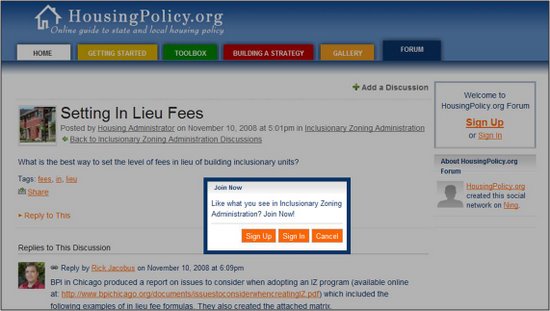
Click on the Sign Up button if you have not already created a profile. (Use Sign In to log on if you are already a Forum member.) On the next page you will be asked to enter basic information about yourself.

Click Sign Up when you are done. The next screen will ask for some more detailed information that will be added to your profile. (See Why do I have to sign up to add comments? for more on why we ask for this information.) Items that have an asterisk next to them are required, and your answers to those with a lock sign will be kept private.

When you have finished creating your profile click Join. The next screen will display a message that your membership is pending approval. We review all applications to avoid spammers. If you fill out the form during the workday, you should be approved in a minute or two; outside of office hours it may take longer. You will receive an email notification when your application has been approved; however, you can still explore most of the site prior to approval by clicking Continue.
If you were trying to post a reply, you will then be returned to the page you were previously visiting. Once your membership has been approved there is just one more step and then you will be able to add your response. Say you are trying to add a response to the Inclusionary Zoning Discussion Group -- you will need to click on the "+ Join Inclusionary Zoning Administration" link at the top of the page. Now you have successfully signed up for the Forum and joined a Group, and can start posting!
Visit the Email Notifications section of this page to learn more about managing your preferences once you have created a profile.
back to topWhy do I have to sign up to add comments?
The HousingPolicy.org Forum is intended to be a resource for all housing practitioners. In order to learn more about who is using the site, and to ensure that we provide the most useful information, we ask that all users create a brief profile before adding comments. All information in your profile that is marked "private" will be kept confidential. Occasionally, we may send updates alerting you to new content available at HousingPolicy.org - you may opt out of receiving these updates by clicking on the "Unsubscribe" link at the bottom of any email message.
back to top
Discussion Forums
What are the posting guidelines for the discussion groups?
The Forum is intended as a venue for dialogue and information exchange among affordable housing practitioners and policymakers, particularly those focused on the state or local level.
Posts in the discussion groups should:
- Be relevant to the thread's topic
- Concern matters that would be relevant to policymakers, practitioners, or advocates in the state and local housing community
- Provide/request information or commentary
Posts should not:
- Reproduce information from other sources without providing proper credit and/or a link to the original source
- Advertise or promote specific services or organizations, with exceptions for cases that are clearly geared toward educating or assisting non-profits or governments on a not-for-profit basis in matters related to the discussion thread
For example, members of the Forum are encouraged to share information about upcoming events, workshops, webinars, and opportunities for collaboration or partnerships, but not to advertise their organization's housing developments, consulting services, etc.
Posts that do not comply with these posting guidelines may be removed at the discretion of the Forum's moderators.
What is a discussion thread?
Each discussion is organized by broad categories called "threads." Each thread addresses a different question or topic, making it easier to follow a specific conversation and reply to other users' questions and responses.
Although most Discussion Groups are open to anyone, you will still need to sign up to for the Forum and join a Group to add your own reply. When you post a new inquiry in a discussion group, you will be creating a new thread, and all responses to your inquiry will be organized under this thread. To avoid duplication, before starting a new thread please check to see if your question has already been addressed, or if it can fit under an existing discussion. You can also use the search box in the upper right corner of the page to find related threads.
How do I respond to a threaded discussion?
If you want to respond directly to the original post in a thread, click on the "Reply to This" link below the main question. If you are signed in to the Forum and have joined the group, a text editor will appear in which you can write your response. (See How do I Sign Up and Add Comments? for help.) Press the "Add Reply" button and your response will be added to the conversation! If you reply to the original post that started the thread, your entry will appear at the end of the thread, below previous responses.

You can also reply directly to someone else's response, rather than to the original inquiry. Just click on the "Reply to This" link that appears directly below the answer you are interested in, and a new text editor window will appear.

Once you have added your reply, you will notice that it appears at a slight indent, making it easier to follow the conversation.

back to top
How do I add a new thread?
If you find that your question has not been asked or answered in an existing thread, once you have signed in to the Forum and joined a group you will be able to create a new thread. Scroll to the bottom of the group page and click on the "Start Discussion" link.

You will be prompted to include a discussion title, post, and identify any "tags." Tags are just one more way to classify discussions and make it easy for other users to find related posts. For example, if you are writing about a program in New York, consider including a "New York" tag. Clicking on the tag will pull up any other responses that have the same tag.
back to top
How do I add an attachment to my reply?
There may be times when you want to attach a PDF, picture, or other file to your reply. To add an attachment, just click on the "Upload Files" link under the text editor box.

An "Attach File(s)" menu will open up. Use the "Browse" button to find the files you want to attach, and they will be accessible to all users when you add your reply.

back to top
How do I add a link to my reply?
If you want to add a link, the first step is to highlight the word or words in your response that you want hyperlinked. Next, click on the icon above the text editor that looks like a "link" in a chain.

A pop-up window will appear in which you can enter the link destination. Enter the website, press OK, and you have created a link! You may notice that extra characters have appeared in the text editor -- these are the "HTML tags" that create the link. They will not appear when you add your reply.

Use the same process to add bold, italics, underlined, or strikethrough text. Again, you will see HTML tags in the text editor, but they will not appear when you add your reply.
back to top
Email Notifications
How do I modify my email settings?
There are many ways to stay up-to-date with new posts added to the Forum, but it is also easy to opt-out of emails altogether. To modify your notification settings at any time, first click on the "Settings" link in the upper right corner of any page.

Next, from the "My Settings -- Profile" page, click on the "Email" link in the left column, which will take you to the "My Settings -- Email" page. From this page, you will be able to modify all of your email preferences, including when messages have been added to Discussion Groups that you have posted to. At the bottom of the page, you can also click on "None: I don't want to receive emails from HousingPolicy.org Forum" to opt out of receiving any emails.
back to top
How do I follow a Discussion Group?
If you want to know any time a new question, or thread, has been added to a Discussion Group that you're a member of, click on the "Follow" link near the top of the page. Once you have decided to follow a Discussion Group, you can always click the link again to "Stop Following."

back to top
How do I follow one thread in a Discussion Group?
If you are not interested in receiving updates when new threads are added to a Discussion Group, but do want to follow a single thread, just click on the "Follow" link at the very bottom of the page. You will receive an email notification when anyone replies to this discussion thread.

back to top
Can I use an RSS reader instead of email?
Yes, you are welcome to use an RSS reader to receive update notifications. Just scroll to the bottom of the Forum main page and click on the RSS icon.

back to top